Global gold miner

Five mines, five SAP instances, one view of every spare.

~$26M
working capital released
47%
less emergency procurement
10 wks
to go live, SAP kept
Read the story
Product
Solutions
Customers
Resources
Company
Book a demoGet a free diagnostic
MRO360 module 7 of 9: decide what to hold

Reorder point optimization for min, max and safety stock Min, max and safety stock that keep up with reality.

Every reorder point is recalculated from criticality, forecast demand, supplier reliability, lead time, service level and stock at other sites. You see current and recommended levels side by side, with the investment implied.

Reorder points from the day you went live.

Min, max and safety stock are set once and rarely revisited, while lead times, criticality and demand move on.

Today

Set at go-live

  • Reorder points were set at ERP go-live and never revisited.
  • Safety stock is a service level someone typed in years ago.
  • Excess rebuilds after every manual clean-up.
With MRO360

Recalculated as things change

  • Recalculated for every material, whatever its MRP type.
  • New levels show the dollar impact before you approve them.
  • Approved values written straight back to your ERP.
No stockouts
on critical wear parts during the first full Halloween and holiday campaign cycle after go-live.Global confectionery manufacturer, 16 sites

Every recommendation shows the criticality, lead time and forecast behind it, and the inventory investment it implies.

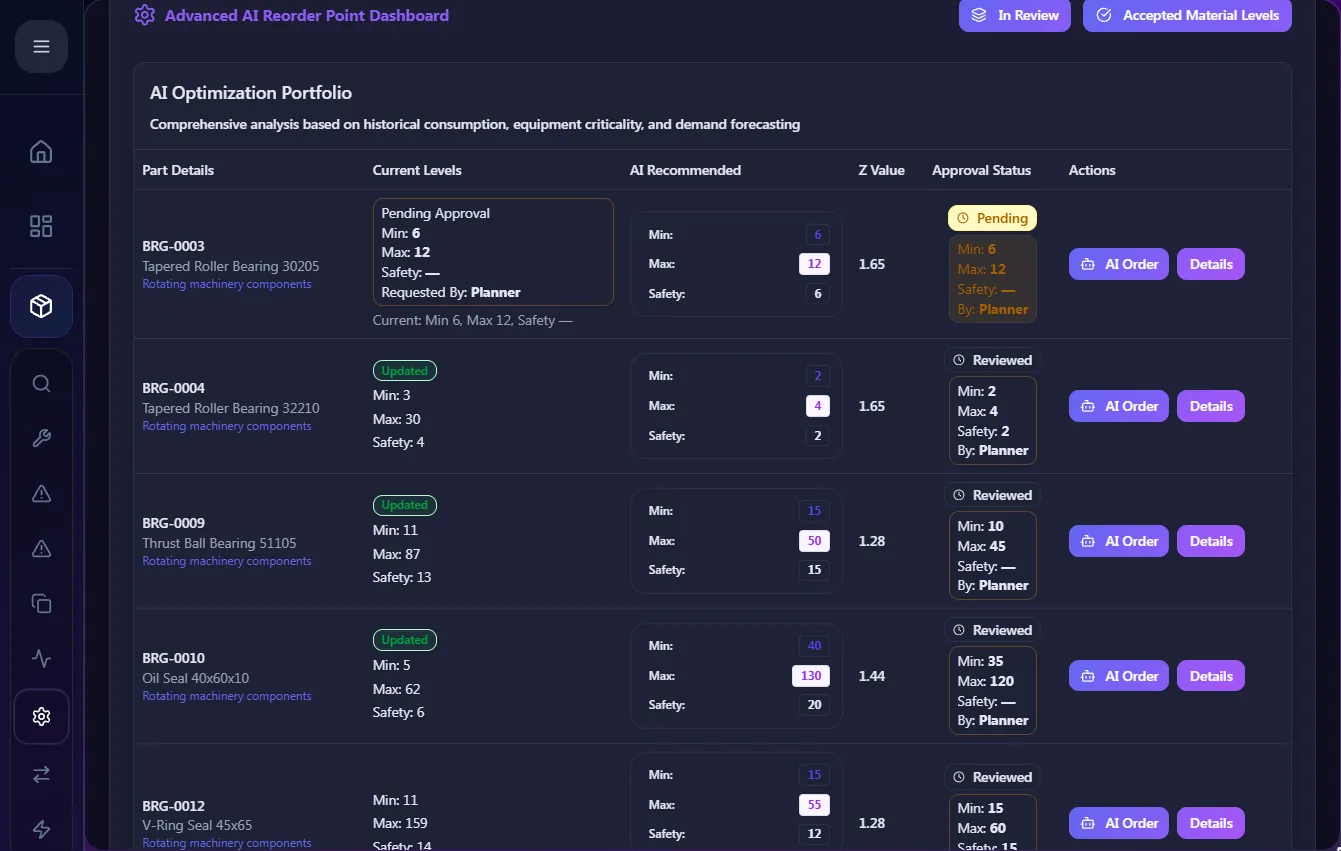
Current versus recommended, side by side

For each part: current min, max and safety stock, the AI recommendation, the service-level factor used and the approval status. Open any part to see the forecast, installed base and open POs behind the number.

  • Inventory investment implied by each change
  • Accept in bulk or one by one
  • Covers manual reorder-point and standard MRP types
MRO360 reorder point optimization screen: Current versus recommended, side by side

AI that places routine orders, within limits you set

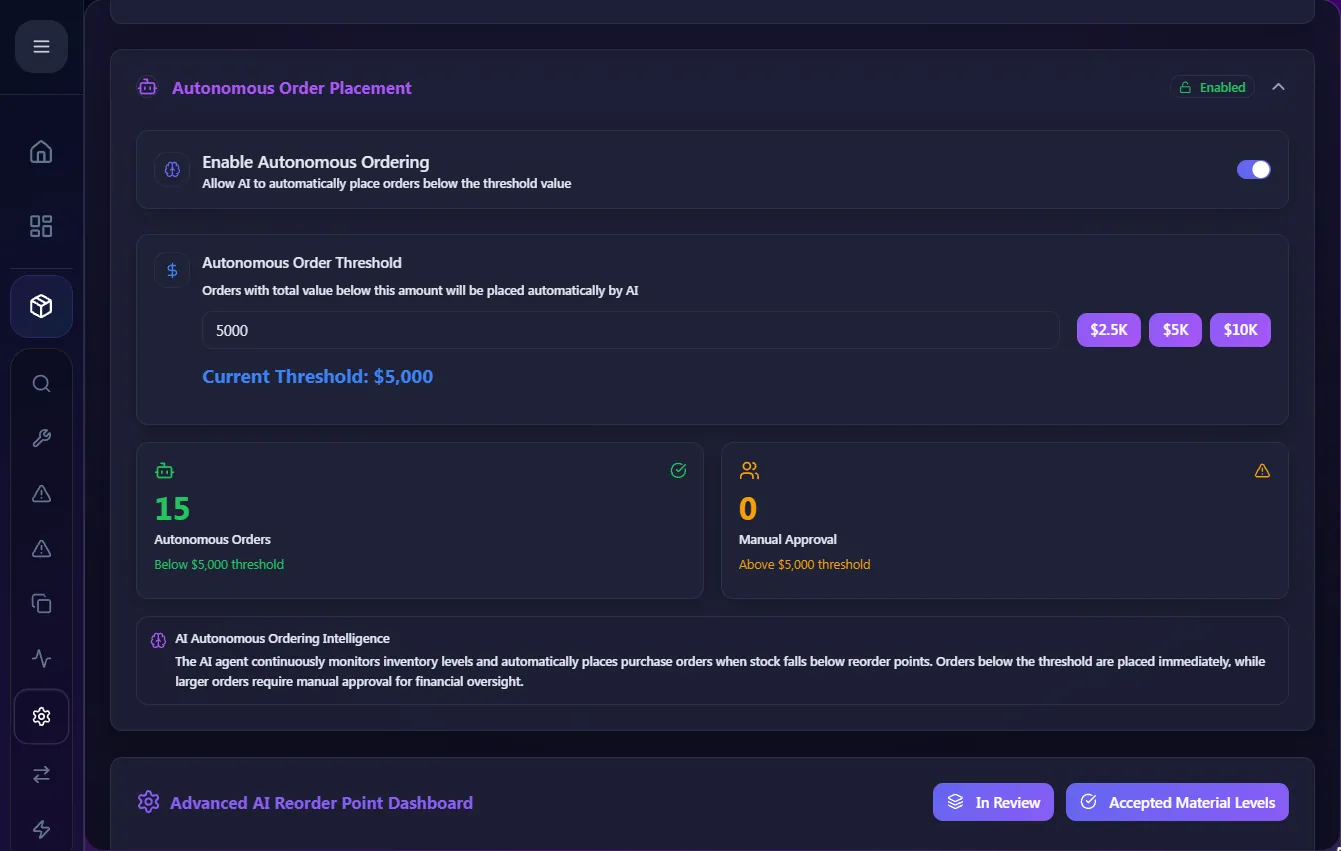
Switch on autonomous ordering and set a value threshold. Below it, the AI agent places replenishment orders when stock falls below the reorder point. Above it, orders wait for manual approval.

  • Thresholds set by your policy
  • Switch it off at any time
  • Every autonomous order logged with its reason
MRO360 screen: AI that places routine orders, within limits you set

Your limit, your approvers.

Autonomous ordering is off until you turn it on, and it only acts below your value threshold. Everything else needs a named approver.

Reorder agentRaise BRG-0003 levels: min 2 → 4, safety 2 → 6

  1. ProposedAI recommendation with its reasons
  2. In reviewChecked and edited by your team
  3. ApprovedSigned off by a named approver
  4. Written backSent to the ERP field it belongs in

Where the analysis turns into stock.

Criticality and forecasts meet real lead times here. Approved levels go back to the ERP fields MRP already reads.

Further reading on reorder point optimization for min, max and safety stock

Questions about reorder point optimization

Will MRO360 change our reorder points automatically?

Only after approval. Recommended levels sit in review until an approver accepts them; then they are written to the ERP.

What does autonomous ordering actually do?

When a part falls below its reorder point and the order value is under the threshold you set, the AI agent places the order. Larger orders go to the approval desk. You can switch it off.

Does it work with SAP MRP types?

Yes, including manual reorder-point and standard MRP types, where SAP never recalculates safety stock.

See how far your reorder points have drifted.

Send material master, movements and purchase history. We recalculate min, max and safety stock for every SKU and show where today's settings are too high or too low.

Material master + movements + PO history
Over-stockedUnder-protectedLead-time gaps
  • Recommended min, max and safety stock per SKU
  • Where current settings are too high or too low
  • Actual lead times against the master data

Check my reorder points

Free diagnostic. Findings within days.

Request received. Pick a time for your kickoff call.

A short call with an MRO specialist. We'll also email a secure link for your extract.

Open the calendar in a new tab

Book A Demo

MRO Master Data Management for a leading $12Bn Oil and Gas company

Oil and Gas organizations face huge unwanted costs in the form of losses, penalties and compensation due to industrial accidents, taking a sizable chunk of their revenues. One of the important reasons for failures and accidents is the breakdown of key industrial infrastructure arising from ineffective management of the material base and inefficiencies in the MRO supply chain that are highly critical for the production and maintenance cycles.

More and more organizations are now looking to establish Master Data Management (MDM) implementations in order to manage their assets through informed decision-making based on reliable data and ensure optimal industrial safety across the enterprise.

About the company:

This US based company is a global leader in providing essential mechanical components for both land and offshore drilling rigs, complete drilling and well servicing rigs, as well as a comprehensive range of tubular inspection, internal coatings, drill string equipment, lifting and handling gear, and downhole drilling tools. It also offers supply chain services through distribution centers strategically located near major drilling and production sites worldwide. With over 800 manufacturing, sales, and service centers globally and annual revenues exceeding $12 billion, the company delivers customer-focused solutions tailored to meet the energy industry’s quality, productivity, and environmental needs.

Material Master Data Challenges

The company faced significant challenges with their master data.
• Lack of consistency and standards for the master data
• Incorrect, incomplete, unclassified and outdated attribute fields of master
data High volumes of data in multiple languages
• Multiple ERP and other legacy instances across the company
• Poorly structured material descriptions
• Lack of data governance and collaboration across cross-functional divisions and locations

Solution & Results Achieved

Solution: Material Master Data Harmonization & Ongoing Maintenance

The company implemented Verdantis Material Harmonize to cleanse and enrich its historical material master data. Using AI-powered tools and the Verdantis Content Repository, the solution classified, standardized, and eliminated duplicate materials.

Once the data was harmonized, Verdantis Material Integrity was deployed for ongoing data governance. It ensured continuous data accuracy through real-time validation, AI-driven classification, and duplication prevention, maintaining high data quality across enterprise systems.

Key Actions Taken:

  • Classified 150,000 materials into 1,210 UNSPSC and 500+ HTS codes
  • Parsed and normalized unstructured material attributes
  • Eliminated duplicates and enriched material descriptions
  • Established real-time data governance and approval workflows
  • Created a centralized repository for cross-functional data access

Results Achieved:

  • Improved Data Accuracy – Eliminated duplicate and inconsistent material records
  • Enhanced Classification – Standardized materials with UNSPSC & HTS codes
    Better Inventory Management – Optimized stock visibility and usage
  • Faster Procurement & Compliance – Enabled seamless material search & regulatory adherence
  • Sustainable Data Governance – Ensured ongoing accuracy with AI-driven maintenance
  • Informed Decision-Making – Centralized data repository for improved operational efficiency

By integrating Material Harmonize & Material Integrity, the company achieved a scalable, AI-powered Master Data Management framework, ensuring long-term data consistency, efficiency, and compliance.

Your data is secure and used solely for intended purposes. We prioritize your privacy and protect your information.