

Enterprise organizations are dependent on unified platforms to handle business processes, assets, and operations on a large scale. SAP reports that its customers account for approximately 87% of global commerce and 84% of global greenhouse gas emissions.
While many believe that it’s all thanks to SAP S/4HANA, there are usually many other areas that work together to make the enterprise platform so useful for business, one of them being SAP Plant Maintenance (PM).
Often, when a maintenance order is created, a technician completes the work and records the costs, after which the equipment is dismantled and reinstalled at another location. The maintenance reports in such incidents may not meet expectations. Many will assume it is a reporting error, but it is not.
It is the lack of understanding of technical objects, installation history, planning relevance, and more that causes this gap. Without this clarity, maintenance history appears inconsistent, costs look misplaced, and preventive plans behave unpredictably.
Here, we explain everything there is to know about SAP PM in this comprehensive guide.
What is SAP PM? An Overview
SAP PM is the maintenance module within the SAP ERP system that organizations use to plan, execute, monitor, and optimize maintenance activities for technical assets. It offers a structured framework for managing technical objects such as functional locations and equipment, recording maintenance history, generating preventive schedules, and more.
This maintenance management is important, especially in asset-heavy industries, because downtimes can be costly. An IBM survey found that 98% of respondents reported losses exceeding $100,000 per hour. 81% of them cited losses exceeding $300,000, while 33% said they could be anywhere between $1 and $5 million.
Without proper maintenance of assets, materials, and equipment, the likelihood of such downtimes increases significantly. Asset management, for example, justifies predictive maintenance for high-value assets, shifts aging assets from preventive to corrective strategies, and informs replacement decisions.
The same goes for material management, too. It ensures automatic component reservation through Bills of Materials (BOMs), procurement triggers, real-time stock visibility, and more. And as for equipment maintenance, it enables organizations to manage multiple sites by sharing spare parts, relocating equipment, and centralizing procurement.
It’s not even just limited to maintenance. The impact of using SAP PM appropriately extends far beyond supply chain, warehousing, and logistics. Suppose a couple of very important pieces of equipment fail, and there’s no replacement available. It will not only result in downtime but also completely derail the supply chain process.
Use of the SAP Plant Maintenance module helps reduce such delays and downtimes to a minimum, keep procurement costs stable, and avoid fragmented cross-plant coordination.
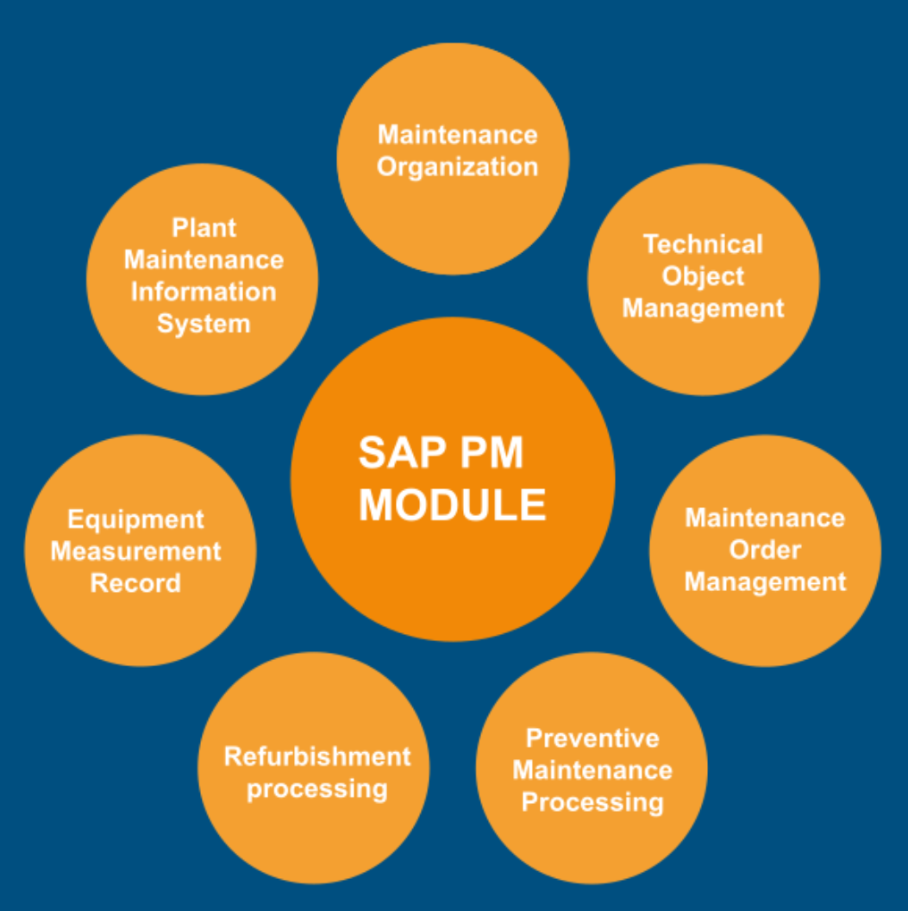
To allow managing all these appropriately, SAP PM relies on multiple components.
Key Components of SAP PM
SAP PM is built on a tightly connected master data and transactional architecture. Each component of this architecture serves a specific function in structuring technical assets, planning maintenance activities, executing work, recording history, and controlling costs.
Technical Objects (Equipment & Functional Locations)
Technical objects in SAP PM are abstract entities used for representing physical assets. They form the structural backbone of the entire module. Everything, from a notification and maintenance order to cost posting and historical record, is tied to technical objects.
The Master Data for asset management includes technical objects, measuring points and counters, work centers, task lists, and maintenance plans. So, when these objects are not properly defined, reporting becomes inconsistent and unreliable.
Some of the key technical objects in SAP PM include:
We will come to this in more depth later in the article.
Maintenance Notifications
Maintenance Notifications are the formal entry point for maintenance activities in SAP PM. Put simply, they are like submitting tickets to the IT department for technical issues in a system. Only this time, they are for plant maintenance.
These notifications capture technical issues, observations, requests, and damage reports before work execution begins. SAP PM notifications also use catalog structures to classify maintenance issues. These include object part, damage code, and cause code classifications, which help standardize failure reporting, enable root cause analysis, and support maintenance analytics. They are used to document the entire situation, from the condition and problem description to technical findings and contextual details.
They act as structured diagnostic records that support compliance tracking and analytics. All this data is stored in the core table QMEL. Within this, the related tables could be:
- QMFE: Damage data
- QMUR: Cause data
- QMMA: Activity data
- IHPA: Partner assignments
- JEST / JSTO: Status management
Each of these notifications should be linked to Functional Location, Equipment, or both. Common notification types include breakdown notifications, maintenance requests, damage reports, and service requests.
In Master Data, you can view the status of notifications. Notification statuses indicate whether work is outstanding, in process, or completed.
Maintenance Orders
These are the execution and cost-controlling engine of the SAP PM module. Once technical objects provide structure and maintenance notifications capture the issues, orders convert the intent into planned, scheduled, executed, and financially traceable work.
Labor confirmation, spare part consumption, external service, downtime entry, and cost settlement, everything runs through maintenance orders. They serve the following purpose:
- Plan maintenance activities
- Allocate work centers and capacity
- Reserve and issue spare parts
- Capture actual labor and material consumption
- Settle costs to the final receivers, etc.
Task Lists
Task lists are used to standardize how recurring maintenance work is planned and executed. They exist to standardize recurring maintenance procedures. Besides that, they also help ensure consistent labor estimation, define operation sequencing, improve cost predictability, and more.
There are three primary types of task lists: Equipment Task List, Functional Location Task List, and General Maintenance Task List. Each list contains header data, operation list, work center assignment, control keys, standard values, and optional alternative sequences.
These are the core tables associated with task lists:
- PLKO: Task list header
- PLPO: Task list operations
- PLAS: Task list sequences
- MAPL: Assignment of task list to object
Maintenance Plans
Maintenance plans help determine when the tasks listed in the task lists should occur. Think of them as the automation engine for preventive and condition-based maintenance. This helps reduce dependency on manual tracking and ensures compliance with inspection cycles.
Maintenance plans are defined in three core tables: MPLA (Maintenance plan header), MPOS (Maintenance item), and MHIS (Maintenance plan call history). Each of these comprises a plan header, maintenance items, scheduling parameters, task list reference, and call object generation logic.
Common maintenance plan types include single-cycle plans, strategy-based plans, and multiple-counter plans, which can use time-based or performance-based scheduling. They are linked to maintenance items that define the object of maintenance within the plan.
Measuring Points & Counters
These are the foundations of condition-based and performance-based maintenance. Measuring points and counters provide real-time intelligence to the system, triggering condition- and performance-based plans.
Measuring points are defined in technical objects in Master Data. They define measuring point category, characteristic, unit of measure, target value, upper and lower limits, and counter overflow logic, which are stored in IMPTT (Measuring point) and IMRG (Measurement documents) tables.
Counters, on the other hand, measure cumulative values. For example, if a condition-based plan has a trigger point after certain hours, counters will measure these hours and trigger the condition. However, these counters may have maximum reading limits. Thus, they will reset once that limit is reached.
The table below represents these core components of SAP PM with their business purpose:
| SAP PM Component | Description | Business Purpose |
|---|---|---|
|
Technical Objects (Functional Locations & Equipment) |
These are structural master data representing locations (IFLOT) and individual assets (ITOB/EQUI). |
|
|
Maintenance Notifications |
Maintenance notifications are pre-execution records. They capture issues, damage, observations, or service requests. |
|
|
Maintenance Orders |
They are execution and cost-control objects containing operations, components, work centers, and settlement rules (AUFK, AFKO, AFVC, RESB, COEP). |
|
|
Task Lists |
These provide reusable templates of operations, work centers, control keys, and standard values for recurring maintenance (PLKO, PLPO, MAPL). |
|
|
Maintenance Plans |
Maintenance plans help schedule recurring maintenance activities using time or performance cycles through MPLA, MPOS, and MHIS. |
|
Functional Location vs Equipment in SAP PM
In SAP PM for maintenance management, technical objects are organized into functional locations and equipment. The aim is to get a structured, traceable, and time-dependent maintenance framework.
Functional Location in SAP PM
A functional location is a structured master data object representing the physical or logical place where maintenance tasks are performed. It is fundamental to aggregate maintenance data from across the plant for location-level reporting. To add to that, it also supports preventive maintenance and a stable structure that is independent of the equipment lifecycle.
The table below shows the key attributes of functional location:
| Attribute | Description | Reference Table |
|---|---|---|
|
Object type |
Structural master object |
IFLOT |
|
Hierarchy |
Multi-level (e.g., Plant → Area → Line → Section) |
IFLOTX |
|
Classification |
Class type 003 |
KSSK / AUSP |
|
Task list assignment |
Can be assigned for standard procedures |
MAPL |
|
Maintenance plan integration |
Preventive or condition-based plans can reference functional locations |
MPLA / MPOS |
Equipment in SAP PM
As the term indicates, equipment within SAP PM represents one individual, serviceable asset that may be installed, dismantled, and relocated. To ensure each piece of equipment is uniquely identified, it is tagged with multiple attributes. This helps store time-dependent history, cost, and technical performance data.
Below, we list essential attributes related to the equipment in SAP PM:
| Attribute | Description | Reference Table |
|---|---|---|
|
Object type |
Individual asset |
ITOB / EQUI |
|
Installation tracking |
Time-dependent; valid from installation date to dismantling date |
EQUZ / ILOA |
|
Serial number integration |
Optional, for unique identification |
OBJK |
|
Classification |
Class type 002 |
KSSK / AUSP |
|
Task list assignment |
Equipment-specific procedures |
MAPL |
|
Maintenance plan integration |
Supports preventive maintenance and condition-based monitoring through integration |
MPLA / MPOS |
Equipment data helps track asset-specific maintenance history. It also enables you to maintain cumulative counters, such as operating hours and cycles. Additionally, the equipment records costs and downtime while supporting relocation and lifecycle tracking.
Key Differences: Functional Location vs. Equipment
While functional location and equipment are both tied to technical objects in SAP PM, there are quite a few differences between them. This table lists some of the key differences between the two:
| Aspect | Functional Location (IFLOT Table) | Equipment (EQUI/ITOB Tables) |
|---|---|---|
| Primary purpose | Helps track spatial hierarchy. For example, PLANT1 > LINE1 > MACHINE A. | This tracks individual assets across their full lifecycle |
| Hierarchy focus | It focuses on the structural organization of locations | Since this is about specific equipment, it focuses on asset-specific hierarchies |
| Installation history | Not applicable (static locations) | Equipment time segments track installation and location history |
| Impact on KPIs and reporting | Limited because it does location-based reporting | Equipment enables accurate KPIs like MTTR via full maintenance history, and offers detailed asset-level analytics |
| Integration | Can be integrated with task lists and maintenance plans | Integrated with task lists, maintenance plans, counters, and BOMs |
Equipment Installation History
Equipment installation history helps maintain an accurate record of all maintenance activities. It records every installation, relocation, or dismantling event. SAP stores installation history using equipment time segments (EQUZ) along with equipment master and location assignment data. Each record preserves validity periods, responsible partners, and integration with other PM objects.
Besides IFLOT, ITOB, and IHPA tables, the equipment installation history process also relies on the Class Master Record KSSK, which keeps each class characteristic detail. It provides one unique Class ID, Class Type, like 002 for equipment and 003 for functional location, status, and Class description.
The Characteristics Assignment (AUSP) comprises all the characteristics of a class, such as OBJNR (object number), ATINN (characteristics ID), and ATWRT (characteristic value). It integrates with the serial number (EQUI + OBJK) to assign each characteristic and class a unique serial number.
Consider the example of maintaining a pump’s history at a plant. Let’s say the equipment’s name is set as Pump EQP-30001. It is assigned the Serial No. SN-CP-2026, and is installed at FL-PUMP-101. The pump has two characteristics: Capacity = 500 GPM and Material = Stainless Steel. Here, you can use the specific serial number to get the equipment’s history, characteristics, class, and other details.
It all starts with installing the equipment. Once installed, SAP creates a time segment for the equipment to maintain installation history, and maintenance orders inherit the assignment. A history for the same is created and stored based on the installation period.
This supports accurate records, detailed reports, planned maintenance timing, and cross-plant teamwork.
BOM Management for Equipment in SAP PM
Another significant concept to learn about in SAP PM is Bills of Materials (BOM). BOM details allow management and administrators to ensure that the components, spare parts, and subassemblies required to perform a maintenance task are available.
BOM integrates closely with various other SAP PM components and SAP modules to streamline asset management. It works with equipment master data, task lists, maintenance orders, and materials management for optimized maintenance execution. The tables associated with BOM are:
- STPO: It lists all BOM item details, including components, quantities, and units of measure.
- STKO: BOM type, status, and validity are all a part of this table, which represents BOM header data.
- MAPL: MAPL features task list assignments that link BOMs directly to operations.
- MAST: Material to BOM assignment
BOM management in SAP PM differs from production BOMs. They both maintain records of components and assets. However, production BOMs focus on ensuring all parts are available to produce a finished product, while BOM management supports equipment repair and maintenance. To ensure the system is in place for all types of repairs, SAP PM uses different BOMs.
Types of BOMs Used in SAP PM
SAP PM supports several BOM types for equipment and maintenance purposes, including:
| BOM Type | Description | Use case in maintenance |
|---|---|---|
| Equipment BOM (E-BOM) | This applies to a specific piece of equipment in the ITOB/EQUI table. | Can be used to track various equipment, such as pumps, motors, pressure transmitters, storage tanks, and boilers. |
| Functional Location BOM (F-BOM) | As the name suggests, this one is assigned to a functional location. | Used for standardization when multiple similar assets exist at a location. |
| Material BOM (M-BOM) | Linked to a material master (MARA/MATDOC). | You can use it when maintenance parts are consumed from standard inventory items. |
| Assembly BOM | This BOM type includes details of all subassemblies as components. | This supports tracking complex machinery with multiple nested parts that can be assigned as subassemblies. |
| Alternative BOMs | It tracks the details of all alternative or multiple BOMs created or used for the same equipment or functional location. | Offers flexibility for spare part selection. |
An SAP Plant Maintenance Bill of Materials is directly linked to either an equipment or a functional location. This automates the process of validating the required components. When properly configured, BOM components can be automatically proposed in maintenance orders and task lists.
Here’s how it is used in maintenance orders:
| Field | Purpose |
|---|---|
| RESB | These are reserved components for order execution copied into the order when BOM is integrated with task lists. |
| AFVC | AFVC helps with integration linking so that each BOM component is linked to the correct task. |
| MSEG / MKPF | Material consumption postings during execution. |
| COEP | This helps track the cost of materials consumed. |
Suppose you want to do monthly maintenance of a centrifugal pump EQP-30001. It has a functional location: FL-PUMP-101, equipment: EQP-30001, task list operation: lubricate bearings, and BOM components: Lubricant (500 ml) and Bearing set (1 unit).
Now, when the maintenance plan triggers an order, say 50012345, it will copy the task list and BOM components. BOM items reserved in RESB will then be drawn from the inventory. The costs associated with the entire maintenance process will be posted to COEP, which will turn the status to TECO or order completed.
Benefits of BOM Management in Maintenance
Using BOM management within SAP Plant Maintenance provides many important advantages for maintenance managers today. Several of these key advantages include:
- Material availability: BOMs help prepare for repair and maintenance tasks. With accurate BOMs, administrators can ensure that all required parts are available and reserved for maintenance.
- Cost accuracy: COEP integration automatically calculates maintenance costs based on BOM components in maintenance orders.
- Preventive maintenance optimization: When BOMs and task lists are linked, BOMs can automate order creation that includes all required parts.
- Inventory management integration: You can integrate it with the SAP Materials Management (MM) module to update inventory in real time.
- Reporting & analytics: BOM usage data enables tracking of material consumption per equipment, functional location, or plant.
- Compliance & auditability: With BOMs, you can trace and track the use of every component, supporting regulatory compliance.
Types of Maintenance in SAP PM
Now that you are familiar with some of the key elements of SAP PM, let us examine the different forms of maintenance you can carry out in SAP PM. As this guide is specially prepared for maintenance, it is not a simple activity. Instead, it differentiates maintenance processes based on order types, notification types, maintenance plans, measurement points, and more. Here are the most common types of SAP PM maintenance:
Corrective (Breakdown) Maintenance
Corrective maintenance is sometimes referred to as breakdown maintenance because it is triggered when equipment breaks down or fails to operate. The aim here is to restore the equipment to its full functional condition.
This is also an emergency repair, as a breakdown can lead to costly downtime. Thus, it is often unplanned and time-sensitive. Since a business plant cannot afford a breakdown, this maintenance receives very high priority.
Implementing this in SAP PM requires the use of the following objects:
| Object | Technical details | Tables |
|---|---|---|
| Notification type | Breakdown notification (e.g., M1, M2) | QMEL |
| Damage code | Object part, damage, cause coding | QMFE |
| Maintenance order | It lists the order type, such as PM01, PM02, etc. | AUFK / AFKO |
| Operations | Tracks repair activities | AFVC |
| Components | Lists the components or spare parts consumed | RESB |
| Cost posting | Tracks labor and material costs | COEP |
| Status flow | Status flow Created (CRTD) → Released (REL) → Confirmed (CNF) → Technically Completed (TECO) → Closed (CLSD) | JEST |
Preventive Maintenance
Preventive maintenance aims to prevent equipment breakdowns. These are scheduled and pre-planned maintenance tasks, such as routine inspection or regulatory compliance checks.
Maintenance plan (MPLA), maintenance item (MPOS), task list (PLKO / PLPO), call history (MHIS), and order type (AUFK) are some of the common attributes used for preventive maintenance. Appropriate scheduling logic goes in the order: call horizon → completion requirement → shift factors → scheduling indicator.
| Preventive Maintenance Type | Trigger Basis | SAP PM Object Used | Example |
|---|---|---|---|
| Time-based maintenance | Calendar intervals | Maintenance Plan | Monthly inspection |
| Performance-based maintenance | Measurement readings | Measuring Points | Service after 5,000 hours |
| Counter-based maintenance | Usage count | Counters | Maintenance after 10,000 cycles |
| Strategy-based maintenance | Multiple criteria | Maintenance Strategy | Oil change + inspection |
Predictive Maintenance
Predictive maintenance uses data and analytics to predict and prevent equipment failure. The use of this type of maintenance, especially in manufacturing plants, is on the rise. From around $10.6 billion in 2024, the global predictive maintenance market is estimated to reach $47.8 billion in 2029. This exhibits a CAGR of a whopping 35.1% over the forecast period.
In SAP environments, predictive maintenance is typically enabled through integration with IoT sensors, analytics platforms, or SAP predictive solutions. SAP PM primarily supports condition-based maintenance through measurement points and counters, while predictive insights rely on advanced monitoring and data analysis.
This type of maintenance depends on measuring points and counters.
| Object | Technical details | Tables |
|---|---|---|
| Measuring point | Continuous or counter-based | IMPTT |
| Measurement document | Reading history | IMRG |
| Threshold limits | Upper/lower boundaries | IMPTT |
| Maintenance plan | Performance-based | MPLA |
Proactive and Improvement Maintenance
Beyond predictive maintenance is proactive and improvement-based maintenance. These types of maintenance aim to eliminate the root causes of failure to ultimately improve the equipment’s performance.
Consider the example of redesigning a pump’s seal. In this situation, there’s an opportunity not only to fix the seal and restore the pump’s function but also to redesign to improve functionality. The same goes for upgrading bearing materials or engineering improvements.
This maintenance is executed through notifications, orders, project integration, and settlement. The notification is an improvement type from the table QMEL. It is a capital or modification order (AUFK) with WBS element linkage (PRPS) and asset capitalization (COEP / ANEP).
Maintenance Plans in SAP PM
Maintenance in SAP Plant Maintenance (SAP PM) is structured around maintenance plans. These plans automate the creation of maintenance calls based on time or performance criteria. A maintenance plan should define which object to maintain, what in the object to maintain, when to maintain it, and whether calls should be orders or notifications.
With a well-configured maintenance plan, you can ensure that preventive tasks are scheduled at appropriate intervals and aligned with operational needs and resource availability.
Single Cycle Maintenance Plans
Single-cycle plans are the simplest and comprise time- and performance-based plans. They fall under preventive maintenance planning.
You can use time-based plans to schedule maintenance activities at regular intervals. This means that it is independent of the asset’s actual usage.
The maintenance cycle here could serve as a trigger. For instance, you can set it to 50 days, every 1,000 operating hours, or specific dates.
Since these are based on a single maintenance cycle, they are suitable for straightforward recurring activities. They support time-based or performance-based scheduling with low configuration complexity.
Then there are performance-based plans that rely on current equipment usage. Counters are assigned to orders to monitor triggers such as operating hours, miles traveled, or production cycles.
A simple example of this is maintaining an aircraft after every 100 takeoffs. Here, the maintenance date is not fixed; it may be a specific date or occur after a regular interval. Instead, it depends on when the aircraft completes its 100th takeoff.
Strategy-Based Maintenance Plans
While single-cycle plans are based on a single package, strategy-based plans can have multiple predefined packages. Each of these packages is aligned with specific time-based or counter-based intervals. Put simply, the plan assigns service tasks based on usage or elapsed time instead of using a uniform schedule. This ensures that different maintenance scopes are triggered at appropriate intervals.
Each package represents a defined set of services with its own cycle parameters. Thus, maintenance is performed in tiers. Smaller activities occur more frequently, and extensive services are scheduled at longer intervals.
Assume a vehicle maintenance strategy has three packages – P1, P2, and P3. Each of these packages can have a different trigger to execute a maintenance order. For this example, let’s assume P1 is executed every 15 days, P2 every month, and P3 every quarter. You can use these packages based on your needs to automate maintenance cycles. While we are taking only a time-based approach in this example, you can also combine time- and performance-based triggers here.
Based on that, consider this example of a strategy-based maintenance plan. Here, an x in any row indicates that maintenance should not be performed on that package.
| Operation No. | Description | P1 (Every 15 days) | P2 (Monthly) | P3 (Quarterly) |
|---|---|---|---|---|
| 01 | Cleaning | x | ||
| 03 | Visual inspection | x | x | |
| 07 | Check oil level | x | ||
| 11 | Brake inspection | x | ||
| 14 | Brake oil change | x | ||
| 18 | Coolant inspection | x | x | |
| 21 | Wheel alignment | x | x | x |
Multiple Counter Plan
A multi-counter plan combines time-based and performance-based scheduling. It uses multiple counters, each assigned to a different dimension or attribute. For example, one can track operating hours, another can monitor mileage, and a third one can check usage cycles. This allows maintenance whenever one of the mentioned rules is triggered.
The relationship between counters can be configured using logical conditions. If you choose the OR logic, the maintenance order is executed when one of the triggers is hit. On the other hand, AND logic means the order is executed when all conditions are met.
Customizing Maintenance Plans
You can further customize the maintenance plan you choose with call horizon, including lead time, offset days, deadline monitoring, shift factor, and factory calendar impact.
Call horizon, for example, specifies that the system send a notification slightly early before the actual due date. If you have scheduled maintenance for an aircraft every 5 months and set a 70% call horizon, the system will trigger it after 3.5 months. This will give you 1.5 months to prepare and complete the maintenance smoothly.
Lead time and offset days define how many days before the planned date the maintenance order should be created, and how much the planned date should be relative to the basic cycle calculation, respectively.
Deadline monitoring (IP30) is used to generate timely maintenance calls. When an administrator runs IP30, it checks all due dates and generates orders or notifications accordingly. The shift factor adjusts the next due date when maintenance is completed earlier or later than scheduled. And the factory calendar influences scheduling by:
- Excluding non-working days
- Adjusting planned dates to working days
- Affecting call generation timing
| Table | Data stored |
|---|---|
| MPLA (Maintenance Plan Header) |
|
| MPOS (Maintenance Item) |
|
| MHIS (Maintenance Plan History) |
|
| MHIO (Maintenance Call Objects) |
|
| MHIT (Maintenance Plan Scheduling) |
|
| T351 / T351P (Maintenance Strategy and Packages) |
|
Besides these, technical object tables such as EQUI (Equipment Master), IFLOT (Functional Location Master), and ILOA (Location and Account Assignment) are used. Similarly, one can also leverage maintenance order and notification tables, including AUFK (Order Master Data), AFIH (PM Order Header), AFKO / AFVC (Order Operations), and QMEL (Quality Notification).
Order Types, Notifications, and Planning Relevance
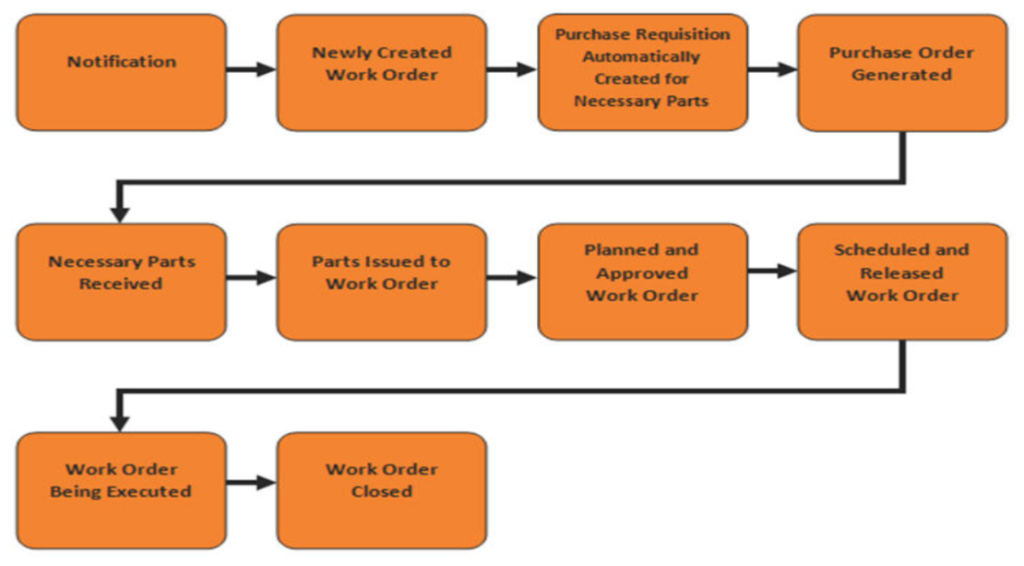
Maintenance in SAP PM is governed by a structured framework that uses notification types, order types, planning parameters, and control keys. These elements are the functional parts that define how the maintenance process flows from planning and creation to execution and completion.
Maintenance Order Types
A maintenance order type defines the processing logic, costing behavior, and integration rules for maintenance execution. Each order type can control the number range assignment, planning plant, costing variant, settlement profile, etc. Here are some common order types you can use:
| Order Type | Purpose |
|---|---|
| PM01 | General maintenance order |
| PM02 | Preventive maintenance order |
| PM03 | Breakdown maintenance order |
| PM04 | Refurbishment order |
| PM05 | Calibration order |
| PM06 | Capital investment order |
| SM01 | Service order |
| SM02 | Service order (with revenues) |
| SM03 | Repair service |
Maintenance Notifications
Maintenance notifications capture technical issues, requests, or malfunction data before order creation. They help control screen layout, partner determination, catalog profile, default order type, and task processing.
| Notification Type | Business Scenario | Typical Outcome |
|---|---|---|
| Breakdown notification (M1) | Equipment failure | Breakdown maintenance order |
| Activity request (M2) | Minor repair request | Planned maintenance order |
| Damage report (M3) | Structural or safety damage | Inspection or corrective order |
| Service request (M4) | External service needed | Service order creation |
Each notification includes a wide range of technical information to help process maintenance orders and notify administrators. A typical notification can include a technical object, a breakdown indicator, the start and end times of the malfunction, the damage and cause code, attachments, and more.
Planning Relevance in SAP PM
You can think of planning relevance as determining whether an order or notification participates in structured maintenance planning. The planning relevance you select affects capacity planning, material requirements planning, scheduling, cost estimation, and work center load.
On the other hand, planning relevant orders appropriately lets you assign operations, schedule work centers, reserve components, and calculate planned costs.
| Aspect | Planned Maintenance | Unplanned Maintenance |
|---|---|---|
| Trigger | Maintenance plan | Breakdown notification |
| Scheduling | Predefined | Immediate |
| Resource planning | Optimized | Reactive |
| Cost estimation | Predictable | Variable |
| Business impact | Controlled | Disruptive |
Control Keys
Control keys are assigned at the operation level in maintenance orders and determine how each operation behaves. They help determine scheduling relevance, capacity requirement generation, costing relevance, confirmation requirement, milestone confirmation, and many other parameters.
There are two configurable tables for control keys. One of them is T430, which determines control key configuration, and the other one is AFVC for order operations.
There’s no list of universal control keys. They are configurable, meaning you can create them and assign a unique value based on your needs. You can view all the control keys you have created in the T430 table. In the T430, go to SPRO → Plant Maintenance and Customer Service → Maintenance and Service Processing → Maintenance and Service Orders → Functions and Settings for Order Types → Define Control Keys.
Benefits of Implementing SAP PM
SAP PM provides organizations with improved asset reliability, cost control, and compliance. It is being implemented across all asset-heavy sectors, including manufacturing, oil & gas, and utilities, as part of a proactive strategy amid the current S/4HANA adoption trend.
Operational Benefits
SAP PM helps organizations manage maintenance activities that can reduce asset downtime and allows organizations to optimize their budgets by tracking real-time costs associated with these inspections & repairs.
It will also enable organizations to support their environmental, social, and government (ESG) compliance by providing easily accessible, audit-ready records.
Lastly, Predictive capabilities can be enabled through integration with SAP IoT solutions, SAP Predictive Asset Insights, or S/4HANA Enterprise Asset Management extensions.
Adoption Metrics
SAP PM adoption continues to grow alongside SAP S/4HANA migration initiatives, with increasing demand for implementation expertise and maintenance process optimization. Moreover, there has also been an increased demand for PM consultants who are experts in SAP PM configurations and integrations.
Integration of SAP PM with Other SAP Modules
While SAP PM offers a wide range of benefits on its own, the real magic happens when it works with other SAP modules. SAP Plant Maintenance executes and manages maintenance processes within the broader SAP ERP system. It is designed for seamless integration with various other SAP modules.
-
SAP MM (Spare Parts and Inventory)
Integration with SAP Materials Management connects maintenance orders with inventory and procurement. Purchasing requisitions originating from PM-issued work orders for non-stock spare parts are processed through the EBAN table. Additionally, material issued from reservations is accounted for in RESB, ensuring an accurate allocation of costs for inventory-linked maintenance activities.
-
SAP PP (Production Planning Coordination)
Maintenance work may sync with factory schedules to limit daily process disruption. Common equipment reports and planned shutdown notices help limit production disruption.
-
SAP FI/CO (Cost Tracking and Settlement)
SAP PM integration with SAP Financial Accounting and SAP Controlling enables accurate capture of maintenance costs. Here, the maintenance orders act as cost collectors for labor, materials, and external services, recorded in COEP. All these costs can be automatically logged for accurate estimation and decision-making. You can also set different settlement rules to determine whether costs are posted to cost centers, assets, or WBS elements.
-
SAP EAM in S/4HANA
In S/4HANA, Plant Maintenance is part of SAP Enterprise Asset Management. With embedded analytics in the two, you can get maintenance KPIs, cost tracking, and asset performance insights in real time. Additionally, you can send trigger data for predictive and condition-based maintenance to integrate sensor data for advanced planning.
SAP S/4HANA also introduces Fiori-based maintenance applications, embedded analytics, and a simplified data model that improve maintenance planning visibility and asset performance monitoring.
How Verdantis Can Support SAP PM Data Management
Implementing SAP Plant Maintenance requires accurate and consistent asset and maintenance data. The problems that organizations usually deal with include multiple records of materials, inconsistent descriptions of assets, disjointed Bills of Materials, and missing equipment records, which may influence the reliability of maintenance planning and reporting.
Verdantis assists businesses in:
Asset and Equipment Data Standardization
Verdantis assists enterprises in standardising the asset, equipment, and spare parts master data between the SAP and the enterprise systems. Reports and lifecycle visibility can be enhanced by removing duplicate records and standardizing data attributes, thereby enhancing the precision of reporting and facilitating the oversight of data distribution.
BOM and Spare Parts Data Optimization
Verdantis helps in cleansing up, enriching, and standardizing the data on the Bill of Materials and spare parts to enhance the accuracy of the data and visibility of data in terms of inventory and maintenance planning.
Master Data Governance for Maintenance Operations
Verdantis offers solutions for data governance and standardization that assist companies in holding similar information, material, and services across enterprise systems.
ERP and EAM Data Harmonization
Verdantis solutions support data harmonization across SAP ERP and enterprise asset management environments, helping organizations improve data quality and enable more reliable maintenance operations.
Key Takeaways
The SAP PM module is an invaluable tool for any organization looking to shift its maintenance program from a reactive approach to a more strategic, optimal use of its assets. The benefits of using the SAP PM module include improved uptime, lower costs, and enhanced connectivity with other SAP modules.
Mastering this module’s functionality will help an organization consistently achieve operational excellence in dynamic manufacturing environments. Also, people trained and knowledgeable in SAP PM will have access to many of the fastest-growing career opportunities outside the manufacturing sector, as more companies are implementing digital transformation projects.
Frequently Asked Questions (FAQs)
What are the primary T-Codes used in SAP PM?
The T-Codes used most frequently for the SAP PM module include:
- IW21 (Notifications)
- IW31 (Work Order)
- IW41 (Confirmations)
- And IW38 (Order List)
Using these T-Codes can streamline the maintenance process across all operational stages.
How does SAP PM support predictive maintenance strategies?
The SAP PM facilitates condition based maintenance using counters and measurement points. SAP predictive and IoT that examine asset condition and equipment performance trends can be built in to enable a predictive maintenance capability.
Is the SAP PM Module only applicable to a manufacturing environment?
No. Many non-manufacturing companies use the SAP PM module to maintain their fleet of vehicles and construction equipment. Because many assets require specific management methodologies, the SAP PM module provides these companies with a flexible structure to manage a wide range of asset types effectively.
What training should I receive before implementing the SAP PM Module?
The recommended training path for SAP PM is to obtain SAP Official Certification and participate in hands-on workshops on configuration, integration, and S/4HANA migration. It will help you develop your overall competency across all aspects of SAP PM Module deployment scenarios.