

Unlocking Excellence in Materials Management with SAP MM
SAP is designed to be a modular ERP. This means that companies can configure it as per their requirements based on what needs to be automated, enforced, managed, viewed and entered the ERP.
Modules in SAP are “Skeletal”, they follow an overarching template based on standard requirements that typically don’t undergo any changes.
For example – Every item purchased, requires a PO, once purchased, the inventory levels will need to be updated etc.
The MM module is a “logistics” centric module. It is designed to enable management of “materials” across the entire supply chain and to automate the tasks that go along with it.
The module also places special emphasis on automating “Procurement” centric tasks like purchasing, spend analysis, supplier consolidation and minimizing Maverick Spending and overheads associated with the stocked inventories.
What does SAP MM Solve for?
The goal of SAP MM is to automate several clerical and monotonous tasks that are necessary for compliance, visibility, efficiency, accuracy and to prevent adverse issues for example – “maverick spending”
To achieve this, SAP MM also integrates with other SAP modules, like SAP FI, SAP PM etc depending on the range of activities an organization is involved in.
Here are some of the other SAP modules
Module | Full Name | Purpose |
SAP FI | Financial Accounting | Balance sheets, Profit & Loss, and Tax. |
SAP CO | Controlling | Internal cost tracking and profitability analysis. |
SAP SD | Sales & Distribution | Selling, shipping, and billing to customers. |
SAP PP | Production Planning | Factory schedules and Bill of Materials (BOM). |
SAP QM | Quality Management | Inspecting goods during receipt or production. |
SAP PM | Plant Maintenance | Maintaining the machines that use the materials. |
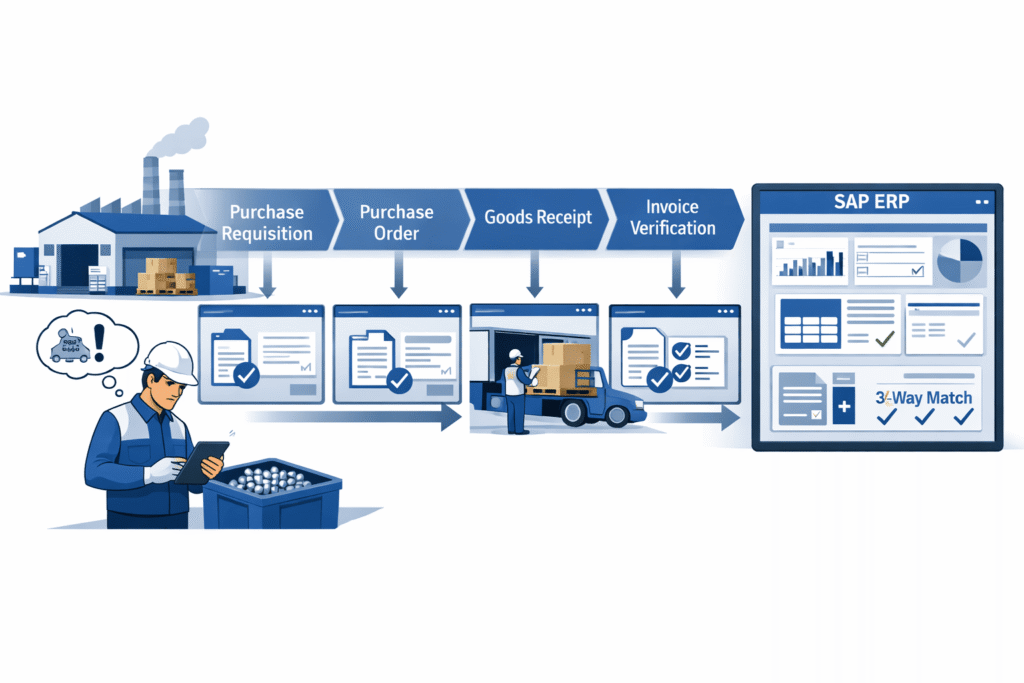
Here’s an example of a “materials’” journey (and it’s propagation across SAP modules):
Efficiency
Larger organizations, with their complex operations, need to keep up to date and accurate records of material movements along with several other details like their characteristics, costs, suppliers etc.
This is required by procurement, inventory management, finance, warehouse & logistics teams.
SAP, by its very nature, is an org-wide software. This means the financial books and accounts, payroll, invoice processing, even production management and plant maintenance are all tracked and updated within the same software.
The journey below illustrates how a physical movement in the real world triggers a digital mirror-action in the ERP system, ensuring the company’s books and stockrooms are always in sync.
Let’s follow the material through its lifecycle and see how real-world actions update SAP in real time.
Phase 1 – Trigger (the Requirement)
Real-World Action: A field technician in a factory floor worker notices they are running low on “Grade-A Steel Bolts.” ERP Action: A Purchase Requisition (PR) is created.
If the system is automated (using MRP), SAP MM will look at the minimum stock level and create this PR automatically without human intervention.
Phase 2 – The PO
The Procurement Manager negotiates a price with a supplier.
ERP Action: The PR is converted into a Purchase Order (PO). This is a legally binding document.
SAP checks the “Vendor Master” to ensure this supplier is approved and checks the “Material Master” for the correct tax codes.
Phase 3: The Arrival (Goods Receipt)
Real-World Action: A truck arrives at the warehouse loading dock. The warehouse clerk counts the boxes.
ERP Action: The clerk performs a Goods Receipt (Transaction: MIGO). This is the “magic moment” in SAP MM where three things happen simultaneously:
- Change in Inventory: The stock count for “Bolts” goes up in the system.
- Accounting Update: An entry is made in the Financial (FI) module to record the value of the new assets.
- Consumption Tracking: If the bolts were for a specific project, the cost is immediately “burned” against that project’s budget.
Phase 4: The Bill (Invoice verification)
Real World Action: The supplier sends an invoice (bill) for the bolts. ERP Action: The Accounts Payable clerk enters the invoice via Transaction: MIRO. SAP performs a 3-Way Match
- Does the Invoice price match the PO price?
- Does the Invoice quantity match the Goods Receipt quantity?
- If “Yes,” the invoice is posted. If “No,” the system blocks payment automatically.
By now it’s obvious that SAP MM does not exist in isolation in a “vacuum”, it’s deeply integrated with other modules for enabling deeper org-wide automations that would otherwise require talent, time and a whole plethora of other resources.
Even then, accuracy and timely execution is not guaranteed and that’s exactly the positioning and selling point for popular ERPs like SAP & Oracle.
Visibility
In larger enterprises, a high-level visibility and a “birds eye view” is critical to understand the critical “leakages” across operations.
Mending broken and antiquated processes introduces a layer of efficiency that can contribute towards either
a) Increasing Organizational Revenue at a faster rate
b) Reducing Costs for improved efficiency across key processes
SAP MM is primarily focused towards achieving b) goal as detailed above by introducing traceability, intelligent automations and deeper analytics for timely and astute procurement + warehousing decisions.
For operations of this scale and size, this is possible only through a software-led approach.
The Real-Life Scenario: The “Critical Pressure Valve”
In the Oil & Gas industry, a single day of unplanned downtime at an offshore rig can cost between $500,000 to $1,000,000.
Because these rigs are often hundreds of miles out at sea, SAP MM isn’t just a “tracking tool” it is the logistics lifeline that prevents a catastrophe.
In this context, SAP MM manages MRO (Maintenance, Repair, and Operations) inventory. Unlike raw materials (like flour for bread), MRO is about “keeping the lights on.”
Imagine a deep-water oil rig in the Gulf of Mexico. A sensor detects that a high-pressure valve is vibrating, it’s about to fail.
In SAP MM, this valve isn’t just “Part #9901.” It is flagged with a Criticality Indicator (ABC/XYZ Analysis).
This article covers criticality in spare parts management separately; in case you’d like to learn more about it as a materials manager
a. The Trigger
- Autonomous predictive Maintenance techniques and software identify a faulty, high-pressure valve based on its vibration, spectrometry or heating – This record is created in SAP PM that then triggers a manual inspection
- Upon inspection, the fault was confirmed warranting a replacement
b. The Visibility Chain (Parallel Actions)
This is where the “Visibility” value-add shines. One click in the warehouse triggers a ripple effect across the entire global enterprise.
Real-World Event | Action in SAP MM (Logistics) | Parallel ERP Digital Twin Action (Governance/Finance) |
The Need: Valve is failing. | MIGO (Goods Issue): The last spare valve on the rig is “issued” to the maintenance crew. | SAP PM (Plant Maintenance): A work order is automatically updated. SAP FI: The $50,000 cost of the valve is moved from “Inventory” to “Operational Expense.” |
The Gap: Rig stock is now Zero. | MRP Run: SAP MM scans all nearby rigs. It sees “Rig B” has a surplus valve that isn’t needed for 6 months. | Logistics Visibility: Instead of buying a new one, SAP creates a Stock Transport Order (STO) to move the valve from Rig B to Rig A. |
The Emergency: No internal stock found. | Purchase Requisition (PR): An emergency PR is created for a new valve from a certified vendor. | Governance: SAP checks the “Release Strategy.” Because it’s an emergency ($), it bypasses the standard 3-day approval and pings the Procurement Director’s mobile for an instant “Digital Sign-off.” |
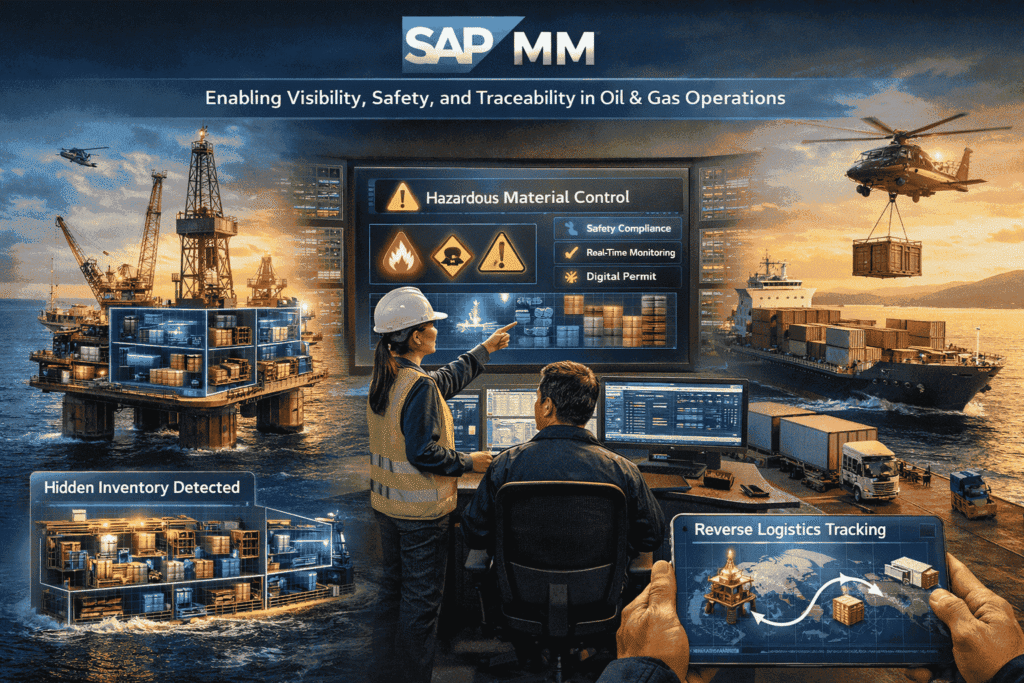
In Oil & Gas, the “Visibility” provided by SAP MM solves three specific high-level problems:
1. The “Ghost Hoarding” Problem
Before SAP, rig managers would hide spare parts in “private stashes” to ensure they never ran out.
Value Add: SAP MM provides Global Visibility. The CEO can see that the company has $200M in “hidden” valves across 50 rigs. SAP MM allows the company to reduce this “safety stock” by trusting the system’s ability to locate and move parts rapidly between locations.
2. Hazardous Material (HazMat) Governance
Oil rigs handle dangerous chemicals and pressurized components.
Value Add: The Material Master contains “Safety Data Sheets” (SDS). SAP MM will physically block a warehouse clerk from putting “Chemical X” next to “Chemical Y” because it knows their reactive properties.
3. The Audit of the “Last Mile”
When a valve is replaced, the old one (the “Core”) is often worth $10,000 in scrap or refurbishment.
Value Add: SAP MM tracks the “Reverse Logistics.” It creates a task to ensure the broken valve is put back on the boat and returned to the mainland for repair. If it doesn’t arrive in 30 days, the system flags a “Financial Variance.”
Depending on the level of maturity and operational complexity, a company can see anywhere between 10-20% reduction in total inventory value within 2 years of implementing SAP MM
This is made possible only thanks to the visibility, traceability, powerful analysis and structured management of the material throughout its fulfilment lifecycle, enabled by SAP MM.
It is important to note that SAP MM provides a broad operating framework and is not without its limitations.
Criticality analysis and inventory management NEED to be contextual, and enterprises still face heavy losses due to improper inventory management practices and inability to ascertain criticality.
Third-party software solutions are generally integrated with SAP to fill the gaps that SAP does not solve out of the box.
MRO360, for example, is Verdantis’ own software solution that works alongside SAP MM and SAP PM for further unlocking efficiencies in Material Management for asset-intensive companies.
Governance & Risk Management
Beyond efficiency and visibility, SAP MM acts as a Governance and Risk Management framework.
For a company, it’s not just about doing things faster; it’s about doing things legally, accurately, and strategically.
Compliance & Regulatory Trails + Automations
Large Organizations are unsurprisingly bureaucratic, and most high value spends need to have a proper approval trail, SOP, security and access control in line with the organization’s policies.
In ERP systems like SAP, tasks associated with Material Management creates an unchangeable audit trail, ensuring accountability and governance without any scope for wrongdoing or sweeping actions “under the rug”
Financial Integrity & Documentation
Probably one of the most well-known “safety net” in SAP MM. It prevents the company from losing money to accidental overpayment or fraud.
A vendor sends an invoice for 100 items at $10 each, but they only delivered 80, or the agreed price was $9.
In SAP, before the payment is authorized, SAP MM performs a 3-way match against;
- The PR & Purchase Order: Precise details on what was ordered and in what quantities
- Receipt of Goods: What was received against this purchase order?
- Invoice: What is the exact breakdown on the cost against the goods received.
If there’s a mismatch or discrepancy between any of these 3, the system blocks the invoice for payment automatically.
The Sub-Modules in SAP MM
SAP MM is powered by several sub-modules, each of which are covered in detail below.
Master Data
Master Data Management is an entire discipline in itself and it represents a single data record for an “object”; learn what Master Data Management is.
This object can be a single record representing
- An Item or Material like “30 MM Solid steel” or a spare part
- A Customer or an Employee
- A Service that is required by the company
- A Supplier or Vendor
- A Fixed Asset or Equipment
Think of master data records as a detailed excel sheet with a unique ID that represents any of the above-mentioned objects.
These data records are designed to be “Unique”, meaning a single data record for every unique object created
For example:
- Every employee will have one unique employee master data record, with a unique employee code
- A Closed Type Centrifugal pump with 250 MM Outer Diameter and SS316 material grade and 40mm bore hole will also be a unique material record and no other master data record should exist for a material with the same features and specifications. (Exceptions are possible but rare). As one can imagine, ascertaining “Uniqueness” can be a bit complex with some materials
Master Data Domains in SAP MM
Master Data Domains exist in every SAP modules. Every master data domain is also part of a “unique” module.
For example, these are the master data domains that exist in SAP
Material Master Data is one of the most critical master data domains in SAP MM.
It represents anything that is procured, stored, manufactured, sold, or consumed by an organization.
A material in SAP does not only mean a physical item. It can represent:
- Raw materials (steel, chemicals, components)
- Semi-finished goods
- Finished goods
- Spare parts
- Consumables (lubricants, stationery, safety items)
When a user creates a Purchase Requisition, the system already needs to know:
- What is being requested
- How it is measured
- How it should be procured
- How it will be valued
All this information is derived from the Material Master record.
During the procurement cycle, the material master is referenced repeatedly:
- In Purchase Requisitions, to define the item
- In Purchase Orders, to determine pricing, units, and delivery data
- During Goods Receipt, to post inventory and quantity updates
- In Invoice Verification, to validate quantities and values
Because the same material master record is used across multiple steps, any inconsistency or duplication directly impacts downstream transactions.
This is why material master data is often described as the foundation of SAP MM.
Supplier Master Data (also called Vendor Master Data in SAP) represents external parties from whom the organization procures goods or services.
A supplier master record contains all the information required to:
- Purchase materials or services
- Process invoices
- Make payments
- Comply with legal and tax requirements
Supplier Master Data becomes critical during source determination and procurement execution.
Once the material or service requirement is known, SAP needs to answer the question:
“From whom will this be procured?”
The supplier master record provides this answer.
In the transaction flow, supplier master data is used in:
Source Lists and Info Records
Purchase Orders, to identify the supplier
Goods Receipts or Service Entry Sheets, for delivery reference
Invoice Verification, to post supplier invoices
Payments, through integration with SAP FI
Because supplier master data is shared between MM and FI, it acts as a bridge between logistics and finance.
Errors or duplicates in supplier master data do not just affect procurement, they directly impact accounting, compliance, and cash flow.
Service Master Data represents services procured by the organization, rather than physical materials.
Unlike materials, services:
Cannot be stored in inventory
Are consumed at the time of execution
Are usually measured in units such as hours, days, or lump-sum quantities
Examples of services include:
Maintenance and repair services
Consulting services
Transportation and logistics services
Installation and commissioning work
In SAP MM, Service Master Data allows organizations to standardize and reuse service definitions. It supports:
Service Purchase Requisitions
Service Purchase Orders
Service Entry Sheets, where service performance is recorded
Invoice Verification, based on accepted service quantities or values
Service Master Data is especially important when:
The same service is repeatedly procured from different suppliers
Detailed service specifications are required for contracts and purchase orders
Service entry and acceptance need to be controlled and audited
By using Service Master Data, organizations can ensure:
Consistent service descriptions across purchase orders
Better control over service procurement
Accurate cost tracking and reporting
Non-Functional Lens:
Once the functional data domains of SAP MM are laid out, it helps to look at the module from a slightly different angle; the non-functional lens.
In simple terms, this lens focuses on how reliably the system behaves when hundreds or thousands of such material movements happen every single day.
Large organizations do not just care about whether a Purchase Order can be created or stock can be received. They care about whether:
- the data is consistent across teams
- the numbers match the financial books
- approvals are enforced automatically
- and every action can be traced back during an audit
SAP MM is designed to handle this scale. It enforces rules in the background, ensures every movement leaves an accounting footprint, and prevents different teams from maintaining their own disconnected versions of the truth.
This is why SAP MM works best when it is treated as an org-wide system rather than a procurement or warehouse tool in isolation.
Purchase Info Records
As procurement volumes grow, organizations quickly realize that repeatedly negotiating and re-entering prices is inefficient and error-prone.
This is where Purchase Info Records come in.
A Purchase Info Record stores the relationship between a material and a vendor. It remembers previously agreed prices, delivery timelines, and purchasing conditions so that buyers don’t start from scratch every time a requirement comes in.
When a Purchase Order is created, SAP MM automatically proposes these values.
This ensures that:
- negotiated prices are reused
- different buyers don’t accidentally pay different rates
- and procurement decisions remain consistent over time
In many ways, Purchase Info Records act as the system’s institutional memory for buying decisions.
Purchasing / Procurement (MM-PUR)
Purchasing in SAP MM controls how an organization converts a requirement into a legally binding commitment with a supplier.
The process usually begins with a Purchase Requisition. This can be raised manually by a user or generated automatically by the system using MRP when stock levels fall below a defined threshold.
Once approved, the requisition is converted into a Purchase Order. At this stage, SAP performs a series of background checks:
- Is the vendor approved
- Is the material correctly defined?
- Are taxes, prices, and units of measure valid?
Only after these validations does the Purchase Order get issued. This ensures procurement remains controlled and compliant, even when volumes are high and timelines are tight.
Inventory Management (MM-IM)
After the Purchase Order is sent out, the focus shifts from procurement to physical execution.
Inventory Management in SAP MM tracks what happens when materials move in the real world.
Every receipt, transfer, or issue of stock is recorded so the system inventory always reflects what actually exists on the shop floor or in the warehouse.
This data is not just used by warehouse teams.
Production planners, finance teams, and maintenance crews all rely on this same information to make decisions.
Inventory Valuation (MM-IV / MM-VAL)
While Inventory Management focuses on how much stock exists, Inventory Valuation focuses on how much that stock is worth.
Each time materials are received or issued, SAP automatically updates the financial value of inventory. These postings flow directly into SAP FI, ensuring that inventory values on the balance sheet are always in sync with physical stock.
Whether an organization uses standard price or moving average price, SAP MM ensures that:
- inventory values are updated in real time
- price differences are recorded transparently
- and financial reports remain accurate
Limitations of SAP MM [with Solutions]
Demand Forecasting & Inventory Optimization
SAP MM records inventory levels, and the underlying master data also records the details of the procured and warehoused materials.
It’s widely touted as a great system for financial accounting but at the same time it has clear functional walls that most companies eventually hit.
SAP MM uses basic “Consumption-Based Planning” (e.g., Reorder Point).
It struggles with complex variables like seasonality, “lumpy” demand, or external market signals like weather or social trends
The problem here is that averages are dangerous. If you sell 0 in January and 200 in February, the average is 100 – but if you only stock 100, you lose half your sales in February and pay for shelf space in January.
Tools like ToolsGroup or Slimstock use Probabilistic Modeling.
Instead of one number, they calculate a range of possibilities (a probability curve). They ask, “What is the 95% likelihood of demand?” and set stock levels to cover that specific risk, not just an average spread out throughout a specified period.
This is a common issue regardless of the “Category” of materials.
For MRO Materials
Asset-intensive companies face additional issues in so far as inventory management is concerned, particularly with management of Spare Parts & Consumables (MRO products).
Inventory management of spare parts, also called MRO (explained in this article), is critical to preventing material stockouts and production downtime. Learn more about MRO.
Companies spend heavily on warehousing and holding a whole plethora of spare parts and consumables for asset management and equipment upkeep.
On the flipside, it’s also quite common for entire production units to come to a total STANDSTILL, simply due to a “material stockout”
So, understanding the “CRITICALITY”, “Consumption Patterns” and likely potential demand for a spare part is key to inventory optimization for MRO products, such that the chances of “Material Stockouts” are eliminated and inventory levels aren’t excessively high.
Criticality analysis in SAP MM is very rudimentary and follows a standard ABC analysis without taking into context several factors like
- Which Equipment is the spare used in
- How critical is that Equipment for the production line
- How critical is the spare part across multiple fixed assets in which it is used
- Industry-specific criticality parameters
- Supplier Lead Time
- Can a Nearby plant fulfil this requirement?
Without taking these aspects into account, a true criticality analysis will be inaccurate.
Software systems like MRO360 are an inventory management solution for spare parts management, primarily around inventory & warehouse management.
The software is developed by our own team here at Verdantis by working alongside our customers who repeatedly face stockouts and inflated inventory issues.
MRO360 sits as a layer on top of SAP MM and SAP PM.
Limited Visibility on Material Movement
Despite being positioned for the benefit of logistics and supply chain teams, at the core of its DNA, SAP MM was built as an Accounting and Internal Control system and cannot solve for all issues pertaining to Logistics & tracking.
In SAP Materials Management (MM), limited visibility on Material Movement isn’t usually a failure of the software itself, but rather a “functional blind spot” that occurs when the digital record in SAP lags the physical reality in the warehouse.
Think of it as a “data fog” – For example, the materials are moving on the floor, but because they haven’t been “posted” in SAP yet, the system still thinks they are sitting in the original bin.
Material Movement Codes
The module has made some provisions to be able to effectively track the materials.
To understand the nature of movement and to track material movement types, a three-digit code is tagged to the data records to ascertain which stage in the supply chain they are in.
The first digits in the codes themselves generally represents a “Movement Type”
Series | Category | Description |
1xx | Goods Receipt | Bringing materials into the system (e.g., from a vendor). |
2xx | Goods Issue | Removing materials from the warehouse (e.g., for production). |
3xx | Transfer Posting | Moving stock between locations, plants, or status types. |
5xx | Adjustments | Receipts without a Purchase Order or stock initializations. |
7xx | Physical Inventory | Used for adjusting stock after a manual count. |
How the codes are structured and how are generally used is best explained in this video.
Both, Functionally and Technically speaking, SAP MM is perfect, it has accommodated for provisions to let it know that a part has moved.
If the record is created, then SAP will record this change and if the record is not created, then SAP has no way of knowing of this change.
But SAP’s design actually encourages these governance failures, more so in asset-intensive environments.
Here’s how;
1. Antiquated UI/UX – The first version of SAP MM was originally released back in the 1990s, since then the module has undergone several changes and introduced several advanced features.
However, the user experience and intuitiveness has not undergone much change. The software was originally designed for clerks sitting at their desks back in the 1990s NOT for a factory floor technician sitting miles away from a computer.
2. Movement “Black Box”
SAP MM doesn’t naturally show you “Stock in Motion.” It shows you “Stock in Storage Location A” or “Stock in Storage Location B.”
The “movement” is just a momentary transaction. If a part is on a truck for three days, it often requires custom reports or specific T-Codes (like MB5T) just to see it
3. Master Data Complexity
Coupled with movement codes, if the categorization and “data readiness” of the materials themselves is poor, the entire process falters, limiting material visibility even further.
To have visibility, your “Functional Locations” and “Storage Locations” must match perfectly. Setting this up in SAP is so complex that many companies take “shortcuts,” which leads to the very visibility issues we discussed.
We will cover master data quality as a challenge in the subsequent section in detail.
Solutions for Limited Material Movement Visibility
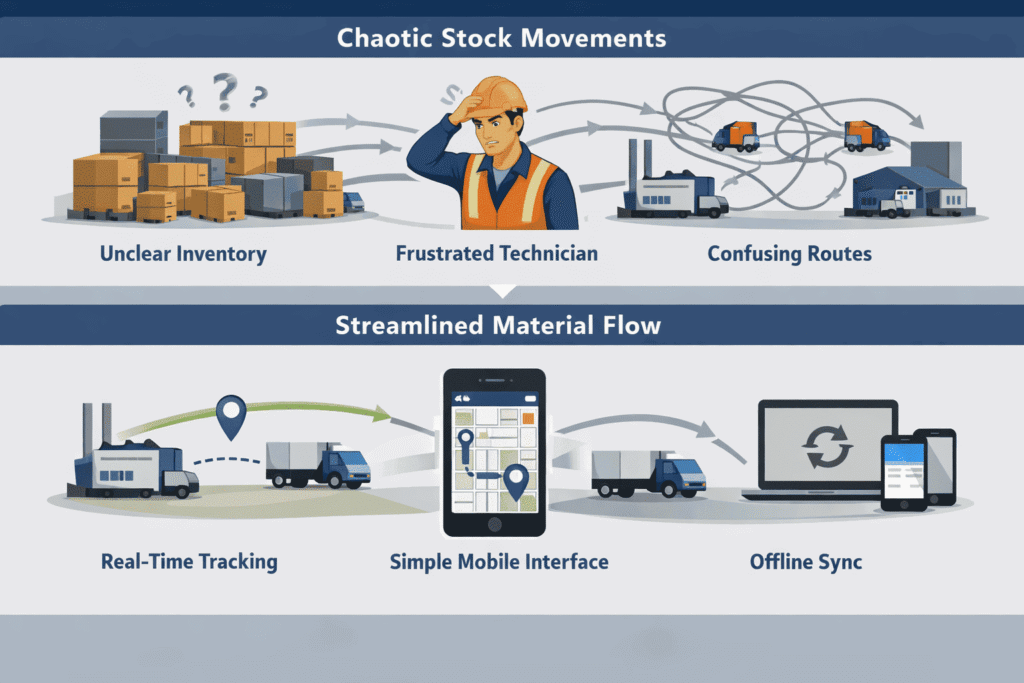
1. The In-Transit Granularity
When you move stock between two distant plants (e.g., from a central warehouse to a remote site), SAP MM uses “Stock in Transit” (Movement 303/305).
The Systemic Failure: SAP MM knows the stock is “somewhere” between Point A and Point B, but it has no native GPS or telematics integration. To SAP, a truck that broke down 5 miles away looks exactly like a truck that hasn’t left the yard yet.
The Solution
Both FourKites and Project44 solve for this challenge and they readily integrate with SAP MM by overlaying the SAP “Stock in Transit” data with real-time GPS tracking.
This solves the “systemic blindness” of not knowing exactly when an asset-critical part will arrive.
2. Interface-specific friction
SAP MM was designed for a “Desk-and-Keyboard” era. The transaction codes (MIGO, MB51) are dense and require significant training.
The Systemic Failure: Executing tasks in SAP MM are generally high ‘Cognitive Load’ tasks and leads to “Input Fatigue”. If a field-technician has to walk 15 minutes back to a terminal to enter a 2-minute part movement, they will naturally batch their work or skip it.
The Solution: Modern 3rd-party apps (or SAP Fiori, to an extent) simplify the UI into “one-click” actions. By making the digital task take the same amount of effort as the physical task, the system removes the incentive to bypass governance.
3. The “Offline” Blind Spot
This is particularly true for non-manufacturing operations like Oil, Gas, Energy Mining, and Utilities, where access to reliable internet is nearly impossible.
The Systemic Failure: Standard SAP MM is a “thin client” system; it requires a constant connection to the server to post a movement. If a technician moves a critical spare part in a dead zone, they cannot record it in SAP at that moment.
The 3rd Party Solution: Software like Innovapptive or Sigga provides “Offline-First” capabilities.
They allow the field-technician to scan the movement into a local database on their device. The second the device finds a signal, it syncs. This removes the “governance” excuse of “I didn’t have signal, so I forgot to record it later.”
Issues with Master Data Quality
“Master data” is the backbone of any SAP module. This is particularly true in the case of the MM module .
Creation of the Material is the very first step before any of the sub-modules can even begin executing their operations.
As covered earlier, there are several master data domains in SAP (as in most ERP systems), for a quick recap, here are the key master data domains in MM
- Material Master Data
- Supplier (Vendor) Master Data
- Service Master Data
For precisely the same reasons as detailed in “Material Visibility” above, there are systemic challenges in how master data records are created and managed in MM.
Highly Recommended: This resource covers the basics of what a material master is, the challenges and solutions to address them.
Antiquated UI, lack of automations, rigid SAP structures, absence of Agentic AI features and a poorly configured material data governance workflow invariably leads to a whole range of Master Data Quality challenges in SAP MM.
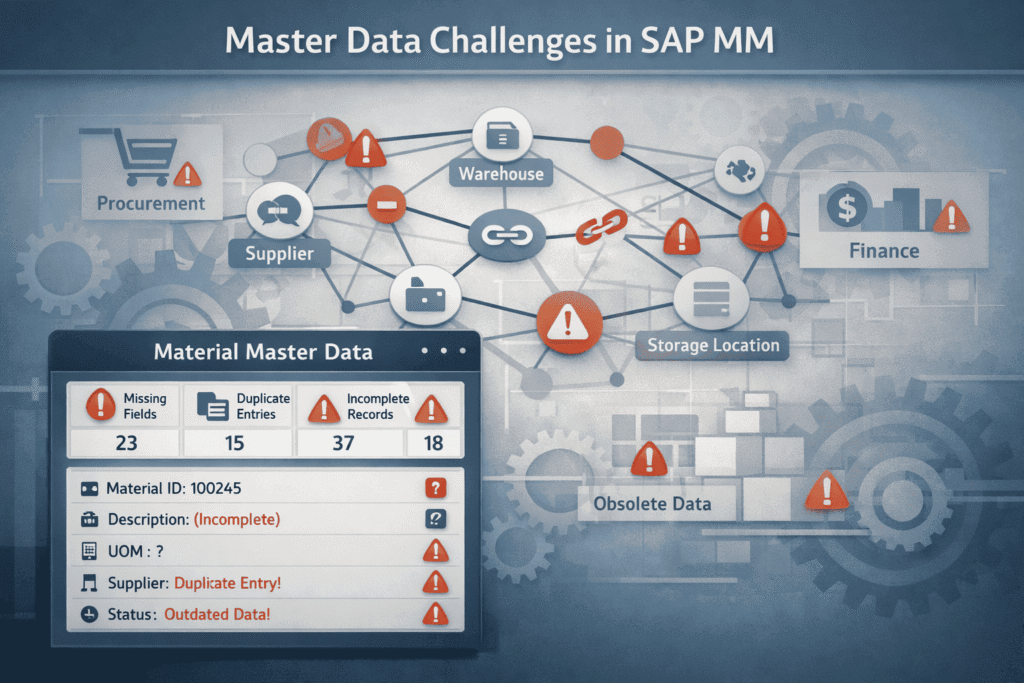
Challenges with Master Data in SAP MM
The impact of poor master data quality is rarely limited to a single transaction or team. Because SAP MM sits at the intersection of procurement, inventory, and finance, even small inaccuracies in master data tend to cascade across processes.
Over time, organizations begin to experience recurring operational and financial issues that can almost always be traced back to how master data is created, maintained, and governed.
Below are some of the most commonly observed challenges.
Absence of a Global, Centrally-accepted Taxonomy:
In most organizations, material creation is decentralized. Different teams, different plants, different priorities.
Even when the same item already exists in SAP, it often isn’t found. Not because SAP can’t store it, but because it can’t recognize it.
– One plant creates a bolt as “Steel Bolt – Grade A.”
– Another calls it “Bolt, Steel, A-Grade.”
– A third shortens it to “STL BLT A.”
Physically, nothing changed. Systemically, SAP now believes these are three different materials.
SAP is doing exactly what it was designed to do. It treats text, descriptions, and classification codes literally. If they don’t match, the system assumes they’re different.
The impact shows up immediately
- Stock is split across multiple material numbers.
- Purchase requisitions are raised for items already in inventory.
- Procurement negotiates prices without realizing volumes are fragmented.
- Inventory valuation becomes distorted.
Industry data backs this up. Studies show that 20-30% of supplier and material master records in SAP environments are duplicated, directly impacting operations and procurement effectiveness (Source: IJFMR).
This is not a system defect. SAP does not create duplicates; inconsistent inputs from users do. The root cause is the absence of a shared, standardized language for materials.
The root cause is the absence of a shared language for materials. The fix is not more training or stricter policing, instead, it is standardization.
The solution is standardization, not stricter policing. Standardized material data frameworks, such as MRO material taxonomy for maintenance items or structured taxonomies for raw materials and finished goods, define how materials must be named, described, and classified before entering SAP.
Once naming conventions, classification rules, and mandatory attributes are enforced, material creation stops being subjective.
Only then does SAP start behaving like a single system, instead of a collection of local interpretations.
Incomplete Data Records & Missing Information
Functionally and technically, SAP allows extremely rich master data.
Practically, most records are created with the bare minimum required to “get past the error message.”
If a material record exists, SAP assumes it is complete. If the data was never entered, SAP has no way of knowing what it should have known.
This is where things break.
A pump might exist in SAP, but without pressure rating, MOC, size, or OEM reference. SAP sees a valid material.
The business sees an unusable one.
SAP MM does not enforce contextual completeness. It enforces technical completeness.
As long as the mandatory fields for that material type are filled, the system is satisfied, even if the record is operationally useless.
In asset-intensive environments, this leads to technicians guessing, buyers re-engineering descriptions, and engineers bypassing SAP altogether.
SAP didn’t fail. The governance around what “complete” actually means did.
Duplicated & Missing Information
Duplication in SAP MM rarely starts with laziness. It usually starts with a failed search.
If a user cannot confidently find an existing material, because descriptions are vague, abbreviations differ, or attributes are missing, they assume it doesn’t exist.
So they create a new one.
Now you have two records:
One with a decent description but no classification
Another with classification but no technical detail
Individually incomplete. Collectively destructive.
SAP MM search relies heavily on how well the original record was described. Poor descriptions and inconsistent naming make “find before create” unrealistic in real-world operations.
The result is predictable:
- Duplicate purchase orders
- Split inventory
- Different prices for the same item
Once trust in SAP search is lost, users stop trying. Duplication becomes the default behavior, not the exception.
Obsolete Data Records
SAP is excellent at remembering things, but terrible at forgetting them.
Materials that were relevant 10 years ago still appear in search results today, even if the equipment is gone, the supplier no longer exists, or the specification has changed twice since.
To SAP, unless explicitly told otherwise, the material is still valid.
There is no natural lifecycle enforcement for materials. Creation is easy. Retirement requires intent, ownership, and discipline; three things most organizations never formally assign.
SAP does not automatically retire materials. Without intent and ownership, obsolete parts linger. This article talks about effectively managing obsolete parts.
The consequence:
- Obsolete items get procured by mistake
- Inventory reports are polluted
- Search accuracy declines further, feeding duplication again
Without periodic review, blocking, and archiving, SAP slowly turns into a historical museum instead of a live operational system.
Absence of Integrations
SAP MM is often treated as the “system of record,” but rarely as the only system touching material data.
Engineering teams have one version, maintenance has another, and, vendors have catalogs that don’t match either.
And none of them talk to each other properly.
So the same data gets re-entered, re-interpreted, and re-formatted, every single time.
The SAP MM assumes it is being fed clean, controlled data. In reality, it sits in the middle of disconnected tools, spreadsheets, and emails.
Every manual handoff introduces delay and distortion. By the time data reaches SAP, it’s already outdated.
Without integrations and a single source of truth, SAP becomes a data sink, not a data authority.
Governance of Data Quality & Approval Mechanisms
Perhaps the most critical challenge lies in how master data creation is governed.
If everyone can create or change material records, then everyone will, each with their own logic, abbreviations, and shortcuts.
And SAP will faithfully store every one of those decisions.
Decentralized creation without standardized approval workflows leads to enterprise-wide inconsistency driven by local convenience.
There is no natural checkpoint asking:
- Should this material already exist?
- Is the description usable by someone else?
- Are the critical attributes filled correctly?
Without data owners, stewards, and approval mechanisms, quality degrades silently over time.
And once degraded, no amount of reporting or analytics can fix it downstream.
Point to Note; “Service master data” has ceased to be a separate master data domain in newer ERP versions, like S4/Hana, instead, this data domain has been subsumed in the “Material Master”
Business Challenges
The above data quality challenges directly translate to;
- Inflated Inventory
- Production Downtime
- Constraints on Visibility & Spend Analysis
Poor “data quality” management practices invariably result in dom
Solutions
To overcome these challenges, several third-party master data management tools with superior UI, build-in third part enrichment capabilities and modern tech stacks have been introduced.
Stibo Systems, Ataccama MDM & SAP’s own product, SAP MDG (Master Data Governance) are well known players in this space
But for true excellence in material master data management, it’s ideal to use an MDM software that is purpose-built for “Material Heavy” business requirements.
Verdantis MDM Suite is Verdantis’ flagship solution for Materials master data management spanning MRO Materials, Direct Materials and consumables.
Here are a few ways in which this software accentuates master data capabilities for production and manufacturing intensive organizations.
Automated Categorization & Data Extraction
In most organizations, material data enters SAP in unstructured or semi-structured form, free-text descriptions, PDFs, legacy spreadsheets, or vendor catalogs.
SAP MM stores this information, but it does not interpret it.
Our MDM Suite uses automated data extraction techniques to parse material descriptions and source documents, identifying key attributes such as material type, dimensions, specifications, and usage context.
These attributes are then mapped to predefined material categories and classification schemas.
This removes manual interpretation from material creation and ensures that categorization is consistent across plants, regions, and users, before the data ever reaches SAP.
Normalization of Master Data Records
Raw material data is rarely standardized. Abbreviations, inconsistent units of measure, and regional naming conventions are common.
SAP MM accepts this variability, but analytics and planning suffer as a result.
Our solution normalizes material records by enforcing standardized naming conventions, units of measure, attribute structures, and description formats.
“STL BLT A,” “Steel Bolt – Grade A,” and “Bolt, Steel, A-Grade” are transformed into a single, governed representation.
This normalization ensures that materials mean the same thing everywhere in the enterprise, not just syntactically, but semantically.
Data Enrichment with Agentic AI
SAP MM relies heavily on what users enter. If information is missing, SAP has no native mechanism to infer or enhance it.
Our AI agent, AutoEnrich, uses Agentic AI to enrich master data by inferring missing attributes, validating specifications, and augmenting records with external reference data where applicable.
The video here provides a step-by-step walkthrough of AutoEnrich in action, showing how agentic AI improves data completeness and accuracy across material master records.
Rather than relying solely on user input, AutoEnrich evaluates contextual signals within the material record and related data domains to improve completeness and accuracy.
This ensures that master data entering SAP is not just populated, but contextually validated and operationally reliable.
Advanced L1 & L2 Deduplication
Traditional deduplication approaches rely on exact matches or simple rule-based checks. SAP MM largely falls into this category.
Our product applies multi-layered deduplication logic:
L1 Deduplication detects obvious duplicates using deterministic rules (exact matches, standardized keys).
L2 Deduplication applies semantic and attribute-based similarity detection to identify materials that are functionally identical but described differently.
The following video provides a walkthrough of how this deduplication framework works in practice
This allows duplicates to be detected before they enter SAP, rather than being discovered months later through inventory anomalies or audit findings.
Plug-and-Play Data Correction
Correcting poor master data inside SAP is often slow, manual, and risky. Changes require coordination across modules and careful governance to avoid downstream impact.
Verdantis MDM Suite enables controlled, plug-and-play data correction by isolating cleansing, enrichment, and validation activities outside SAP.
Only approved, high-quality master data is synchronized back into SAP MM.
This significantly reduces disruption to live operations while steadily improving data quality over time.
Integrations with related Data Domains
Material master data does not exist in isolation. It intersects with vendors, equipment, functional locations, BOMs, and procurement data.
Verdantis MDM integrates material data with related master data domains, ensuring alignment across systems such as SAP MM, SAP PM, and external procurement platforms.
This creates a unified data foundation where materials are consistently defined in relation to where they are used, who supplies them, and how they are consumed.
The result is not just cleaner data, but a system that supports visibility, traceability, and intelligent decision-making across the entire material lifecycle.
Weak Strategic Sourcing & Bidding
SAP MM was designed as a “system of record” and not as a collaboration software to liaise with third-party vendors and compare the best possible solution.
As far as strategic procurement is concerned, there are a few inherent limitations in SAP MM operates.
The RFQ Graveyard
In SAP MM, the RFQ (Request for Quotation – T-Code: ME41) is essentially a digital form. A user creates it, but SAP has no native “Portal” for vendors to see or track it. This makes bid management extremely tricky for the discerning procurement professional.
Manual Data Entry
Several SOPs require the purchasing/procurement professional to print/email the RFQ to vendors. Once shared, the procurement will have to rely on antiquated techniques and manually type those prices back into SAP, using Transaction Codes like ME47 to compare them.
Vendor Discovery
Being a platform that operates primarily as a system of record, SAP MM only knows the vendors you have already onboarded. It can’t help you find a new, cheaper valve manufacturer in a different region.
This limitation necessitates that vendors look for alternate third-party platforms. The challenge is that such a software will need to tightly integrate with SAP MM and due to its “System of Record” capabilities.
The Solution
Due to growing concerns around this, SAP has launched SAP Ariba Sourcing, a full-service suite that includes a “Supplier Discovery” module.
Lately, SAP has also been introducing several AI-features like (Joule) to recommend suppliers based on the commodity codes in the purchase requisition.
Inability to Manage Complex Analysis
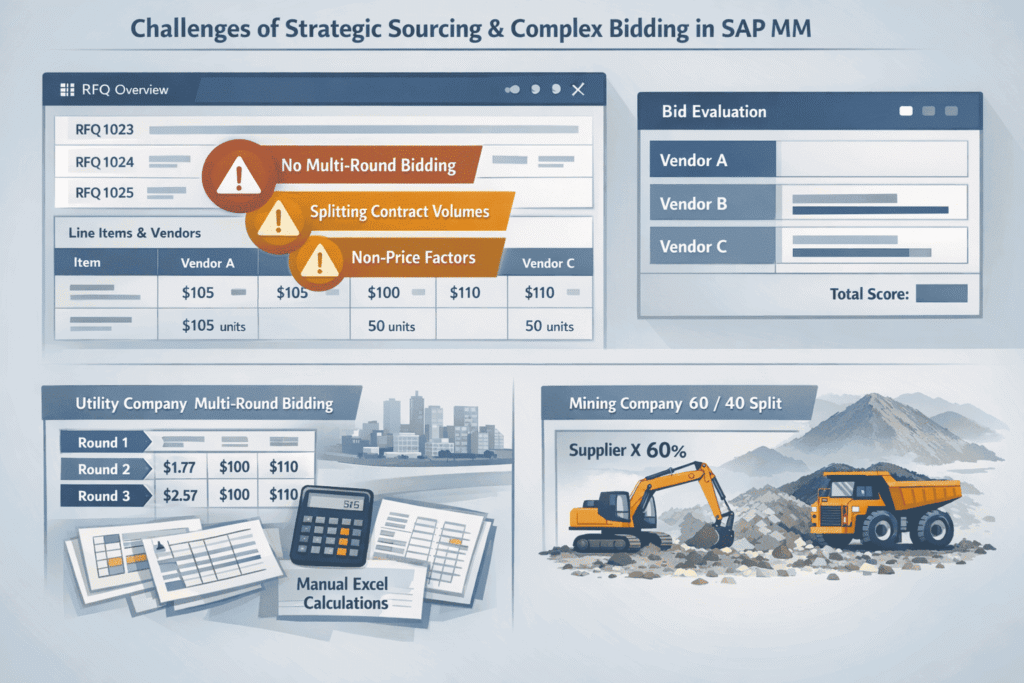
SAP MM cannot easily handle complex “multi-round” bidding, reverse auctions, or “What-if” scenarios.
For example; “What if I award 60% of the volume to Vendor A and 40% to Vendor B?”)
SAP MM is notoriously linear, especially in the stages related to Strategic Sourcing & Awarding (specifically the ME41/ME47 RFQ transactions).
It expects a simple one-to-one relationship: you ask for a price, you enter the price, and you pick the cheapest line item.
In asset-intensive industries, where a single maintenance contract for “Valves” or “Maintenance Services” might involve 500-line items across 10 global sites, SAP MM’s “Price Comparison” feature feels like using a calculator when what one really needs is a supercomputer.
Here are a few cases where this starts to become an issue
1. No Multi-Round Logic
The module “assumes” that an RFP is a one-and-done document. It does not account for the dynamic, evolving and iterative nature within modern business negotiations, where prices, terms and even SCOPE evolves over several weeks.
To run a “Best and Final Offer” (BAFO) or a second round of bidding, a buyer must either overwrite the original bid data (losing the audit trail of the initial price) or manually create a brand-new set of RFQ documents for every vendor, which is administratively exhausting.
A real-world example of this in action can be found below;
A Power Utility is bidding out a 3-year contract for vegetation management (tree trimming) around power lines.
Round 1: 10 vendors submit general rates
Round 2: The utility company narrows it down to 3 vendors and asks for “Best and Final” pricing based on new weather-contingency clauses.
Round 3: During negotiations, all the vendors also suggested “tilling of the soil” around the vegetation for better longevity and maintenance, which warranted an “increase in scope” of the current RFP, which the company agreed with.
The Bottleneck: The buyer will now have to manually re-enter all line-items for those 3 vendors into new documents to compare them against the Round 1 benchmarks and scope
2. The “Splitting Headache”
A best practice in “Strategic Sourcing” often requires “Award Optimization”, that is, splitting the volume of work between vendors to mitigate risk and reliance on a single supplier. For example; If the supplier’s factory floods or a strike occurs.
For Instance; A mining conglomerate requires 500,000 litres of a specialized lubricant per year.
The buyer would want to award 60% of the contract scope to a global tier-1 supplier for cost-competitiveness and stability AND the remainder of the contract to a local “Indigenous-Owned” business to meet ESG targets.
The Bottleneck: Natively, SAP MM cannot readily show the buyer the “Cost of the Trade-Off”. For instance, splitting the award will cost $50K more, but reduce supply chain risk by 30%.
To solve for this, the buyer has to build a complex, disconnected Excel model to find these answers.
3. Non – Price Factors
In heavy industrial operations, the “cheapest” bidder for the supply of a specific “part” or “material” doesn’t necessarily “win” every time.
In fact, quite the opposite.
That’s not to say that pricing is not considered during the “award” phase.
Buyers often need to rely on mathematical models that consider qualitative parameters for decision-making.
This includes lead-time, cost due to failure, supplier reliability, geography proximity and a myriad other factors. Since non-performance can be far far more expensive than the cost-savings achieved by selecting the lowest bidder.
And while SAP does have features for “Vendor Evaluation”, it doesn’t dynamically integrate into the bidding process. It is simply too trick to create a formula in an RFQ that, for example, says: (Price * 60%) + (Lead Time *20%) + (Safety Rating * 20%) = Final Score
The Solution
SAP themselves are cognizant of many of these limitations, and as a solution, they sell add-ons for solving these challenges, to a certain extent.
SAP’s Software like SAP Ariba, Coupa, and even third-party solutions by companies like Keelvar sits “on top” of SAP MM to handle this complexity:
Here’s how.
Scenario Builders: They allow buyers to toggle a button: “Show me the 60/40 split scenario” vs. “Show me the cheapest single-source scenario
Weighted Scoring: They provide a “Side-by-Side” dashboard where technical scores (from Engineering) and safety scores (from HSE) are mathematically blended with the commercial bid.
Automated Push-Back: Once the complex analysis is done in the third-party tool, it “pushes” the final, split awards back into SAP MM to create the finished Purchase Orders automatically.
The table below explains, in short, how these systems operate.
Feature | Standard SAP MM Process (Manual) | Third-Party Sourcing Tool (Optimized) |
Multi-Round Bidding | Manual Duplication: Must create new RFQ documents for BAFO (Best and Final Offer) or manually overwrite prices, destroying the audit trail of Round 1. | Native Versioning: Buyers click “Start Next Round.” The system carries over previous bids and flags changes in price or terms automatically. |
“What-If” Splits | Excel Side-Car: Buyer exports data to Excel, manually calculates a 60/40 split, and then must manually create two separate Contracts in SAP. | Constraint-Based Modeling: Buyer sets a rule: “Split volume 60/40.” The tool instantly calculates the total cost impact of that split across 500+ line items. |
Non-Price Weighting | Subjective/Offline: Technical scores (Safety, Quality) are usually kept in a separate PDF or spreadsheet and compared “mentally” against the price. | Weighted Scorecards: Engineering and Safety teams enter scores directly. The tool calculates a “Value Score” ($Price + Technical Rank$) to rank vendors. |
Combinatorial Bids | Impossible: Cannot handle a vendor saying: “I will give you 10% off if you give me all 5 sites, but only 2% if you give me one.” | Package Bidding: The AI engine analyzes “Bundle” offers to find the mathematically cheapest combination across multiple sites and vendors. |
Audit Trail | Fragmented: The “Why” behind an award is often hidden in a buyer’s email or a saved Excel file on their desktop. | Centralized: Every “What-If” scenario and the logic used to reject a cheaper vendor is logged for internal auditors and SOX compliance. |
Which Teams Generally Benefit from excellence in SAP MM?
– Supply Chain Teams depend on SAP MM for reliable stock visibility across plants and warehouses. Strong SAP MM practices help reduce excess inventory, prevent material stockouts, and enable faster, data-driven planning decisions.
– Procurement Professionals use SAP MM as the system of record for purchasing and supplier data. When material data is consistent, procurement teams can consolidate demand, negotiate better pricing, enforce approval controls, and avoid duplicate or unnecessary purchases.
– Data Management Experts ensure the long-term health of SAP MM by governing material master data. Their role is critical in enforcing standardization, preventing duplication, managing material lifecycles, and maintaining SAP as a trusted enterprise-wide source of truth.